
Rear fog lamp
1. Remove the socket and bulb assembly by turning it anticlockwise.
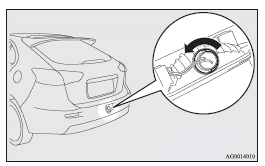
2. Remove the bulb by pulling it out.
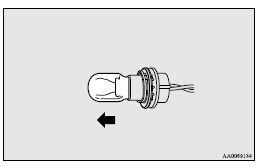
3. To install the bulb, perform the removal steps in reverse.
See also:
Inside tailgate release
The inside tailgate release is designed to provide a way to open the tailgate
in the case of a discharged battery.
The tailgate release lever (see illustration) is mounted on the tailgate.
You a ...
Buying a Mitsubishi Carisma
This is a bit of a difficult one, as there's not too much to worry about,
which is excellent news for you. So, provided you're buying a car with full
service history, you shouldn't be in for any n ...
Disconnection and connection
To disconnect the battery cable, stop the engine, first disconnect the negative
(–) terminal and then the positive (+) terminal. When connecting the battery, first
connect the positive (+) termi ...