
Cargo room lamp
When replacing the bulb, put the cargo room lamp switch into the “OFF” position.
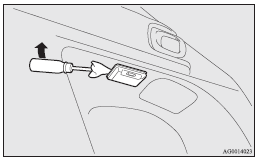
1. Insert a straight blade (or minus) screwdriver with a cloth over its tip into the notch of the lamp assembly and pry gently to remove the lens.
2. Remove the bulb by pulling it out.
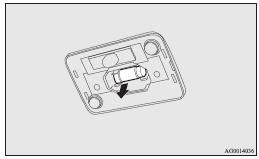
3. To install the bulb, perform the removal steps in reverse.
See also:
Brake pedal free play
Stop the engine, depress the brake pedal several times, and press down the pedal
with your fingers until initial resistance is felt. This distance should be within
the specified range.
A- Free ...
Engine switch
In order to prevent theft, the engine will not start unless a preregistered keyless
operation key is used.
(Engine immobilizer function) If you are carrying the keyless operation key,
you can sta ...
Curtain airbag system
The curtain airbags are contained in the front pillars and roof side rail. The
curtain airbag is designed to inflate only on the side of the vehicle that is impacted,
even with no passenger in the ...