
Electronic immobilizer (Antitheft starting system)
[For vehicles equipped with keyless operation system]
For information on operations for vehicles equipped with the keyless operation system, refer to “Keyless operation system: Electronic immobilizer (Anti-theft starting system)”.
[Except for vehicles equipped with keyless operation system] The electronic immobilizer is designed to significantly reduce the possibility of vehicle theft. The purpose of the system is to immobilize the vehicle if an invalid start is attempted. A valid start attempt can only be achieved by using a key “registered” to the immobilizer system.
 NOTE
NOTE
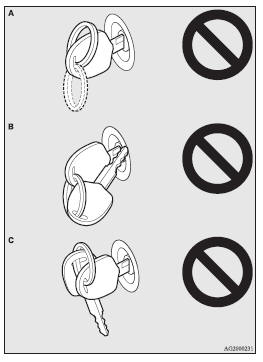
• In the following cases, the vehicle may not be able to receive the registered
ID code from the registered key and the engine may not start.
• When the key contacts a key ring or other metallic or magnetic object (Type
A)
• When the key grip contacts metal of another key (Type B)
• When the key contacts
or is close to other immobilizing keys (including keys of other vehicles) (Type
C) In cases like these, remove the object or additional key from the vehicle key.
Then try again to start the engine.
If the engine does not start, we recommend you to contact your MITSUBISHI MOTORS Authorized Service Point.
• If you lose one of them, contact your MITSUBISHI MOTORS Authorized Service Point as soon as possible.
To obtain a replacement or extra spare key, take your vehicle and all remaining keys to your MITSUBISHI MOTORS Authorized Service Point. All the keys have to be re-registered in the immobilizer computer unit.
The immobilizer can register up to 8 different keys.
 CAUTION
• Do not modify or add parts to the immobilizer system. Doing so could cause the immobilizer to malfunction.
See also:
To play tracks from a Bluetooth® device (vehicles with Bluetooth® 2.0 interface)
You can wirelessly connect a digital audio player or cellular phone supporting
Bluetooth® to listen to the tracks on the connected device.
Refer to “Bluetooth® 2.0 interface” for the connecti ...
Audio system anti-theft feature
To prevent theft of the audio system, the control panel can be removed. Always
remove the control panel when you leave the vehicle.
Removing the control panel
Turn the ignition switch to the OFF ...
Headlamp washer switch*
The headlamp washer can be operated with the ignition switch “ON” position and
the lamp switch at “” or “”
position.
1- Push the button once and the washer fluid will be sprayed on ...