
3-point type seat belt (with emergency locking mechanism)
This type of belt requires no length adjustment.
Once worn, the belt adjusts itself to the movement of the wearer, but in the event of a sudden or strong shock, the belt automatically locks to hold the wearer’s body.
 NOTE
NOTE
• You can check if the belt locks by pulling it forward quickly.
To fasten
1. Pull the seat belt out slowly while holding the latch plate.
NOTE
• When the seat belts cannot be pulled out in a locked condition, pull the belts once forcefully and then return them. After that, pull the belts out slowly once again.
2. Insert the latch plate into the buckle until a “click” is heard.
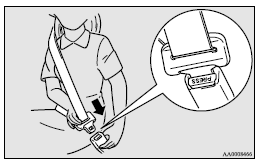
 WARNING
• Never wear the lap portion of the belt across your abdomen. During accidents it can press sharply against the abdomen and increase the risk of injury.
• The seat belts must not be twisted when worn.
3. Pull the belt slightly to adjust slackness as desired.
To unfasten
Hold the latch plate and push the button on the buckle.
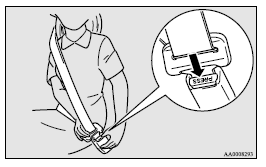
NOTE
• As the belt retracts automatically, keep holding the latch plate while retracting so that the belt stows slowly. Failure to do this could damage the vehicle.
See also:
Engine oil
To check and refill engine oil
Petrol-powered vehicles
Diesel-powered vehicles
The engine oil used has a significant effect on the engine’s performance, service
life and startability.
Be s ...
Cigarette lighter
The cigarette lighter can be used while the ignition switch is in the “ON” or
“ACC” position.
1- Push all the way in.
The cigarette lighter will automatically return to its original posi ...
“ASC OFF” switch
The ASC is automatically activated when the ignition switch is turned to the
“ON” position. You can deactivate the system by pressing down the “ASC OFF” switch
for 3 seconds or longer.
Wh ...