
Safe driving techniques
Driving safety and protection against injury cannot be fully ensured. However, we recommend that you pay extra attention to the following:
Seat belts
Before starting the vehicle, make sure that you and your passengers have fastened your seat belts.
Floor mats
 WARNING
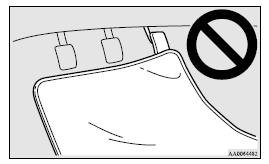
• Keep floor mats clear of the pedals by correctly laying floor mats that are suitable for the vehicle.
To prevent the floor mats from slipping out of position, securely retain them using the hook etc.
Note that laying a floor mat over a pedal or laying one floor mat on top of another can obstruct pedal operation and lead to a serious accident.
Carrying children in the vehicle
• Never leave your vehicle unattended with the key and children inside the vehicle. Children may play with the driving controls and this could lead to an accident.
• Make sure that infants and small children are properly restrained in accordance with the laws and regulations, and for maximum protection in case of an accident.
• Prevent children from playing in the luggage compartment. It is quite dangerous to allow them to play there while the vehicle is moving.
Loading luggage
When loading luggage, be careful not to load above the height of seats. This is dangerous not only because rearward vision will be obstructed, but also the luggage may be projected into the passenger compartment under hard braking.
See also:
To operate
To operate the system, move the gearshift lever or selector lever to the “R”
position while the ignition switch or the operation mode is in ON. To stop the operation,
push the “SONAR” swit ...
Bulb capacity
When replacing a bulb, use a new bulb with the same wattage and colour.
Outside
Except for vehicles equipped with high intensity discharge headlamps
1. Front turn-signal lamps: 21 W (WY21W)
2. H ...
Except for vehicles equipped with rain sensor
The windscreen wiper and washer can be operated with the ignition switch in the
“ON” or “ACC” position.
If the blades are frozen to the windscreen, do not operate the wipers until the
ice ...