
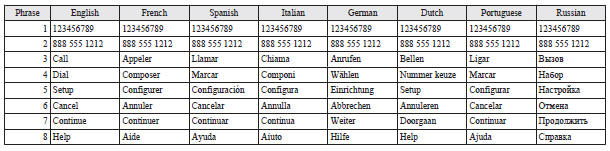
Enrollment commands
See also:
Front/Rear ashtray (moveable)
To use the moveable ashtray, open the lid.
Mounting position for moveable ashtray
The moveable ashtray can be fitted at the indicated position. Refer to “Cup holder”.
...
Electric power steering system (EPS)
The electric power steering system (EPS) uses an electric motor to assist the
turning of the steering wheel.
Note
► During repeated full-lock turning of the steering wheel (for example, whi ...
Ventilation slots
The ventilation slots in front of the windscreen should be brushed clear after
a heavy snowfall so that the operation of the heating and ventilation systems will
not be impaired. ...