
Driving range
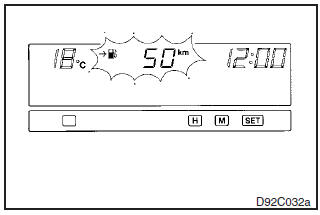
For vehicles with MITSUBISHI genuine audio, driving range can be displayed.
This value shows the distance (in km or miles) that can be driven on the fuel remaining in the fuel tank.
NOTE
(1) When the driving range is displayed, if the driving range drops below
50 km (30 miles), alarm sounds and the display shows a flashing. When this occurs,
top up the fuel tank as soon as possible.
Even when an item other than the driving
range is currently displayed, the alarm sounds and the driving range appears for
5 seconds when the driving range drops to the 50 km, 25 km and 10 km (or 30 miles,
15 miles and 6 miles) levels. Then, the original item is again displayed.
(2)
The driving range varies depending on road conditions, the manner of driving and
other related factors. Consequently, the display should be used only as a guide;
top up the fuel tank as soon as possible.
See also:
Sunshade
WARNING
• Never leave a child (or other person who might not be capable of safe operation
of the sunshade switch) in the vehicle alone.
• Before operating the sunshade, make sure that nothing ...
Rear hatch
Warning
► It is dangerous to drive with the rear hatch open since carbon monoxide
(CO) gas can enter the cabin. You cannot see or smell CO. It can cause unconsciousness
and even death.
&# ...
Using the MIVEC engine
The MIVEC engine automatically switches its intake- valve control between a low-speed
mode and a high-speed mode in accordance with driving conditions for maximum engine
performance.
NOTE
• T ...