
How to lock and unlock the steering wheel
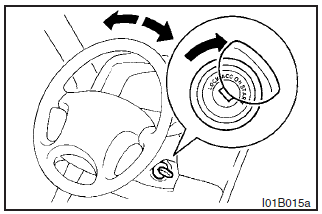
To lock
Remove the key at the “LOCK” position. Turn the steering wheel until it is locked.
To unlock
Turn the key to the “ACC” position while moving the steering wheel slightly.
CAUTION
Remove the key when leaving the vehicle.
NOTE
If the front wheels are turned, the anti-theft lock may sometimes make it difficult to turn the key from “LOCK” to “ACC”. Firmly turn the steering wheel to the left or to the right as you turn the key.
See also:
Brake assist system
The brake assist system is a device assisting drivers who cannot depress the
brake pedal firmly when it is necessary to do so (such as in emergency stop situations)
and provides greater braking fo ...
Information screen (when the ignition switch is turned from “OFF” to “ON”)
When the ignition switch is turned to the “ON” position, the display screen switches
in the following order.
1- Screen when the ignition switch is “OFF”
2- System check screen
3- Screen ...
For cold and snowy weather
Ventilation slots
The ventilation slots in front of the windscreen should be kept clear of leaves
or brushed clear after heavy snowfall, so that the operation of the heating and
ventilation syste ...