
Ventilators
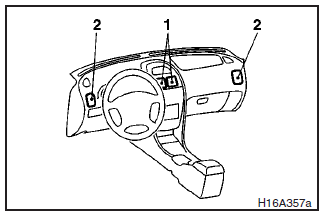
1- Centre ventilators
2- Side ventilators
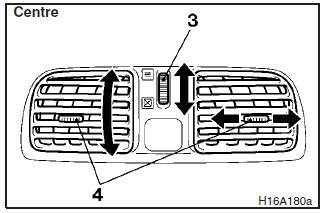
Air flow and direction adjustments
3- Ventilator dial
4- Knob
 – Open
 – Close
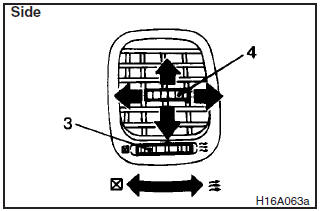
Set the ventilator dial (3) to the open position. Air always flows out from the ventilator when the blower is switched on.
Adjust the direction of the air flow by moving the knob (4), and horizontal and vertical adjustment can be made.
NOTE
On an air conditioned vehicle, the cool air from the ventilators may appear as a mist. This is due to moist air being suddenly cooled by the air conditioning. This will clear after a few moments.
See also:
Air selection switch
To change the air selection, simply press the air selection switch.
A sound will be made every time you push the switch.
► Outside air: Indication lamp (A) is OFF Outside air is introduced int ...
Running-in recommendations
During the running-in period for the first 1,000 km (620 miles), it is advisable
to drive your new vehicle using the following precautions as a guideline to aid
long life as well as future economy ...
Chrome parts
In order to prevent spots and corrosion of chrome parts, wash with water, dry
thoroughly, and apply a special protective coating. This should be done more frequently
in winter. ...