
Leg area heating
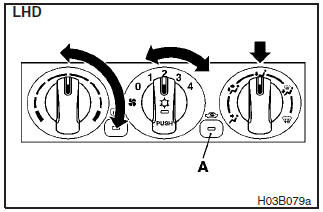
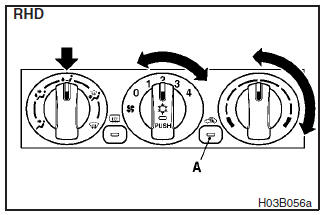
Set the mode selection dial to the position shown in the illustration and set the air selection switch (A) to the outside position.
Adjust the temperature by turning the temperature control dial clockwise or anticlockwise.
Select the desired blower speed.
NOTE
When the maximum heating is needed, set the blower speed at 3rd position.
See also:
Cigarette lighter
The cigarette lighter can be used while the ignition switch is in either “ON”
or “ACC”.
1- Push all the way in.
The lighter will automatically return to its original position with a “c ...
Engine specifications
Petrol-powered vehicles
Diesel-powered vehicles
...
Wheel covers
To removeWrap the tip of the jack bar with a cloth, insert it deeply into
the notch provided in the wheel cover, and pry the cover away from the wheel. Using
the same procedure at the other wheel ...