
Side turn-signal lamps
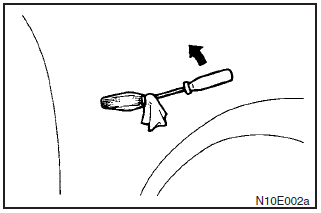
Insert a straight blade (or minus) screwdriver at the edge of the lens, remove the socket assembly and bulb together by turning it anticlockwise, and then remove the bulb by pulling out.
Big Bud Seed Stockers für Indoor-Fans: big bud feminisiert mit Infos – eine passendeNOTE
Wrap a piece of cloth around the straight blade (or mines) screwdriver in order to avoid scratching the lens and the body.
See also:
Charge warning display
If there is a fault with the charging system, the warning display is displayed
on the information screen in the multi-information display. The warning lamp in
the instrument cluster also illumin ...
Redesigned Front Suspension
The MacPherson strut front suspension is similar in layout to the previous
Lancer's, but all-new, with a sharpened focus on enhancing rigidity while
reducing weight and lowering the roll center. S ...
To activate
1. Push the main switch (A) at the end of the auto–speed control lever. 2.
Pull down the lever (B) while driving at the desired speed.
When the main switch (A) is ON, the “CRUISE” indicat ...