
Rear combination lamps
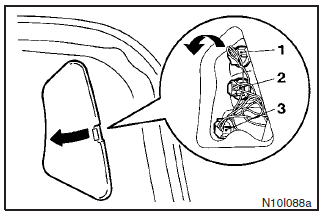
Hatchback
Remove the lid.
Turn the bulb socket anti-clockwise to remove it. And remove it anti-clockwise while pressing it inward.
1- Tail lamp
2- Rear turn-signal lamp
3- Stop lamp
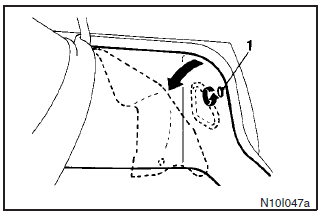
Sedan
Turn and remove the knob (1) and then turn down the cover.
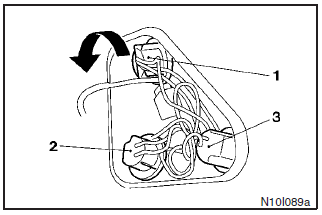
Turn the bulb socket anti-clockwise to remove it. And remove the bulb from the socket by turning it anticlockwise while pressing it inward.
1- Rear turn-signal lamp
2- Stop and tail lamp
3- Tail lamp
See also:
Starting the engine (diesel-powered vehicles)
1. Fasten the seat belt.
2. Make sure the parking brake is applied.
3. Depress and hold the brake pedal.
4. Fully depress the clutch pedal.
Note
► On vehicles with the Auto Stop & Go ( ...
Turn-signal lever
1- Turn-signals
When making a normal turn, use position (1). The lever will return automatically
when cornering is completed.
2- Lane-change signals
When moving the lever to (2) slightly to cha ...
Weatherstripping
To prevent freezing of the weatherstripping on the doors, bonnet, etc., they
should be treated with silicone grease. ...