
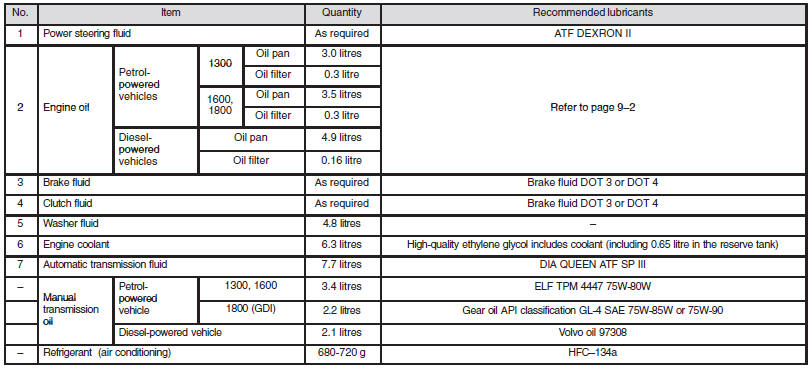
Capacities
See also:
Seat
1-Front seat
• To adjust forward or backward ®
• To recline the seatback ®
• To adjust seat height (driver’s seat only) ®
• Armrest* ®
• Heated seats* ®
2-Rear seat
• Armre ...
Rear room lamp
When replacing the bulb, put the rear room lamp switch into the “OFF” position.
1. Insert a straight blade (or minus) screwdriver with a cloth over its tip into
the notch of the lamp assembly a ...
Coming home light
This function turns on the headlamps in the low beam setting for about 30 seconds
after the ignition switch is turned to the “LOCK” position.
1. Turn the combination headlamps and dipper switch ...