
Outside (Front)
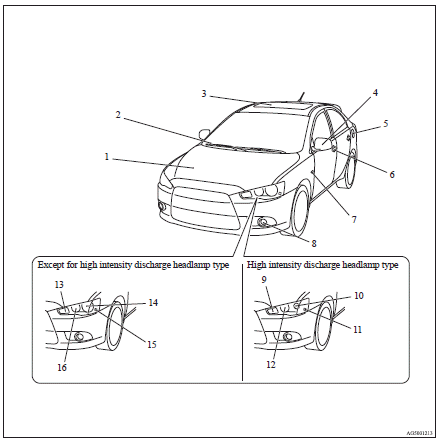
1. Bonnet
2. Windscreen wipers
3. Sunroof
4. Outside rear-view mirrors
5. Fuel tank filler
6. Locking and unlocking
Keyless entry system
Keyless operation system
7. Side turn-signal lamps
8. Front fog lamps
9. Front turn-signal lamps
10. Headlamps, high/low beam
11. Position lamps
12. Bending lamp (Adaptive Front lighting System (AFS))
13. Front turn-signal lamps
14. Headlamps, low beam
15. Position lamps
16. Headlamps, high-beam
See also:
Sports mode
Whether the vehicle is stationary or in motion, sports mode is selected by gently
pushing the selector lever from the “D” (DRIVE) position into the manual gate (A).
To return to “D” range ...
2012 Mitsubishi Outlander Review
After spending a couple of weeks test-driving the 2012 Mitsubishi Outlander,
I've decided it's a great car for dads. Compared to many moms, dads tend to keep
their parenting style as simple as pos ...
Loading luggage
When loading luggage, be careful not to load above the height of seats. This
is dangerous not only because rearward vision will be obstructed, but also the luggage
may be projected into the passen ...