
Outside (Rear)
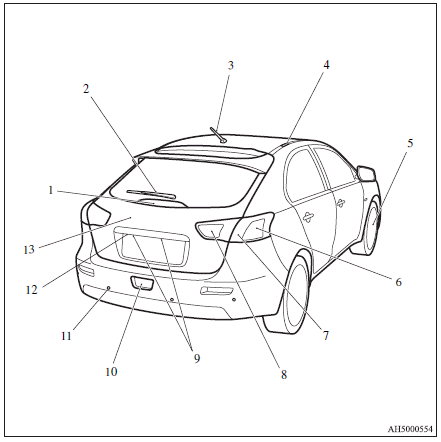
1. High-mounted stop lamp
2. Rear window wiper
3. Antenna p.
4. Roof carrier mounting brackets
5. Tyre inflation pressures
Changing tyres
Tyre rotation
Wheel covers
Tyre chains
6. Rear turn-signal lamps
7. Stop and tail lamps
8. Reversing lamps
9. Licence plate lamps
10. Rear fog lamp
11. Corner and back sensor locations
12. Rear-view camera
13. Rear hatch
See also:
New language
Fittingly, MMC's complete family of Passenger Vehicles / Crossovers / SUVs
will also see a gradual transition to a re-focused design language, as seen with
the all-new Mitsubishi Outlander. While ...
Check engine warning lamp
This lamp is a part of an onboard diagnostic system which monitors the emissions,
engine control system or CVT control system/Twin Clutch SST control system.
If a problem is detected in one of th ...
Economical driving
For economical driving, there are some technical requirements that have to be
met. The prerequisite for low fuel consumption is a properly adjusted engine.
In order to achieve longer life of the ve ...