
Steering wheel height adjustment
1. Release the tilt lock lever while holding the steering wheel up.
2. Adjust the steering wheel to the desired height.
3. Securely lock the steering wheel by pulling the tilt lock lever fully upward.
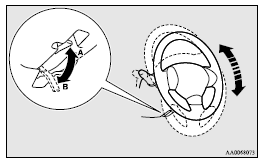
A- Locked
B- Release
 Warning
► Do not attempt to adjust the steering wheel while you are driving the vehicle.
See also:
Fuel remaining display screen
This displays the amount of fuel remaining.
CAUTION
• For petrol-powered vehicles, do not run out of fuel, or the catalytic converter
may be adversely affected.
If the warning display appear ...
Towing the vehicle by a tow truck
Caution
► This vehicle must not be towed by a tow truck using sling lift type equipment
(Type A) as illustrated. Using a sling lift will damage the bumper and front end.
► Do not tow ...
Alarm activation
The turn-signal lamps blink and the siren sounds for approximately 30 seconds.
Refer to “Alarm activation”.
Note
► The alarm will resume if unlawful actions are taken again, even if the ...