
Steering wheel lock
[For vehicles equipped with keyless operation system]
For information on operations for vehicles equipped with the keyless operation system, refer to “Keyless operation system: Steering wheel lock” on pages 1-15, 1-19.
[Except vehicles equipped with keyless operation system]
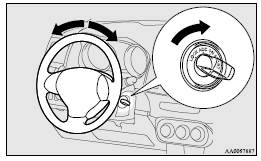
To lock
Remove the key at the “LOCK” position.
Turn the steering wheel until it is locked.
To unlock
Turn the key to the “ACC” position while moving the steering wheel slightly right and left.
 Caution
► Remove the key when leaving the vehicle.
In some countries, it is prohibited to leave the key in the vehicle when parked.
See also:
“ASC OFF” switch
The ASC is automatically activated when the ignition switch is turned to the
“ON” position. You can deactivate the system by pressing down the “ASC OFF” switch
for 3 seconds or longer.
Wh ...
Steering control switch
1- Volume up button
2- Volume down button
3- SPEECH button
4- PICK-UP button
5- HANG-UP button
Volume up button
Press this button to increase the volume.
Volume down button
Press this button ...
Automatic transmission INVECS–II 4A/T, Sports Mode 4A/T (Intelligent & Innovative
Vehicle Electronic Control System II)
Designed for optimum control and equipped with adaptive control capabilities,
the electronically controlled transmission optimally matches gear shifts to almost
all driving and road conditions.
C ...