
Gearshift lever operation
The Twin Clutch SST has 6 forward gears and 1 reverse gear.
The individual gears are selected automatically, depending on the position of the gearshift lever, the speed of the vehicle and the position of the accelerator pedal.
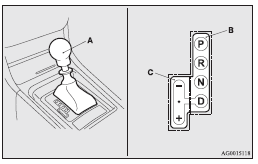
The gearshift lever (A) has 2 gates; the main shift gate (B) and the manual shift gate (C).
 Warning
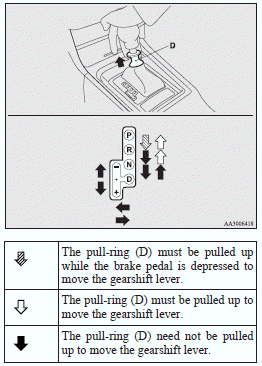
► If the pull-ring is always pulled up to operate the gearshift lever, the
lever may be accidentally shifted into the “P” (PARK) or “R” (REVERSE) position.
Be sure not to pull up the pull-ring when performing the operations indicated by
in the illustration.
► Always depress the brake pedal when shifting the gearshift lever into the other
position from the “P” (PARK) or “N” (NEUTRAL) position.
Never put your foot on the accelerator pedal while shifting the gearshift lever
from the “P” (PARK) or “N” (NEUTRAL) position.
 Note
Note
► If the brake pedal is not depressed and held, the shift-lock device activates
to prevent the gearshift lever from being moved from the “P” (PARK) position.
► Do not accelerate immediately after moving the gearshift lever. It may take some
time for the transmission to shift to the selected gear.
► When the gearshift lever is operated while the Twin Clutch SST fluid temperature
is low, the time required to shift to the selected gear may be longer than usual.
See also:
Spare wheel information
Check the air pressure of the spare tyre frequently and make sure it is ready
for emergency use at any time.
Maintaining the spare wheel at the highest specified air pressure will ensure
that it ...
Unlocking the doors and rear hatch
When you are carrying the keyless operation key, if you press the driver’s or
front passenger’s door lock/unlock switch (A), or the rear hatch OPEN switch (B)
within the operating range, all t ...
SRS warning lamp
There is a supplemental restraint system (“SRS”) warning lamp on the instrument
panel. The system checks itself and the lamp tells you if there is a problem. When
the ignition key is turned ...