
To change the indication on the screen of the inside rear-view mirror
It is possible to turn off the screen of the inside rearview mirror and change the language of the warning messages on the screen.
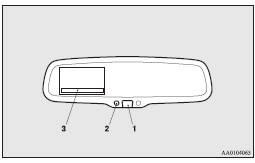
To temporarily set the non- display mode
If you press the switch (1) while the image appears on the display, it goes off temporarily.
To return to display mode, press the switch again or turn the ignition switch to the “ON” position after turning to “LOCK” or “ACC” position.
To permanently set the non- display mode
1. Turn the ignition switch to the “ON” position.
 Caution
► For safety reasons, do not perform following operations with the engine running.
2. Put the gearshift lever or the selector lever in the “R” position.
3. Press and hold down the switch (1) (for about 15 seconds).
While you keep the switch pressed, the orange indicator (2) comes on. When the image goes off, the non-display mode setting is completed.
To change the language of warning text(3)
1. Turn the ignition switch to the “ON” position.
Caution
► For safety reasons, do not perform following operations with the engine running.
2. Put the gearshift lever or the selector lever in the “R” position.
3. Press and hold down the switch (1) to enter language selection mode (for 6 to
11 seconds).
In this mode, the image appears and the green indicator (2) comes on.
4. Press the switch until the desired language appears on the display.
Each time you press the switch, the language will change to the next one. When the
warning text flashes, setting is completed.
See also:
To change the language of PTY display
You can select your favourite language between English, French, German, Swedish,
Spanish and Italian.
1. Turn off the radio. 2. Turn the radio back on while holding down the PTY
button (B). 3. An ...
Brake warning lamp
This lamp illuminates when the ignition switch is turned to the “ON” position,
and goes off after a few seconds.
Always make sure that the lamp goes off before driving.
With the ignition swi ...
Rear window wiper and washer
The rear window wiper and washer switch can be operated with the ignition switch
in the “ON” or “ACC” position.
INT- The wiper operates continuously for several seconds then operates inte ...