
Rear shelf panel
 Caution
► Do not place luggage or other items on the rear shelf panel. Any items on the rear shelf panel would obstruct your rearward view, and they could fly forward and cause injuries or other mishap in the event of hard braking.
To install
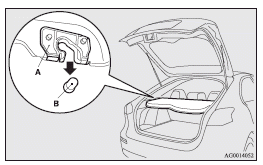
1. Insert the concave portion (A) on the underside of the rear shelf panel into the inside protruding portion (B) of the rear hatch.
Caution
► Lightly push the rear shelf panel to make sure that the concave portion (A) is set firmly in the protruding portion (B) of the rear hatch. If the rear shelf panel is not securely locked in place, it could unhook while driving and cause injuries.
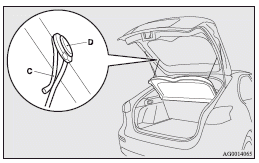
2. Hang the strap (C) of the rear shelf panel on the hook (D).
To remove
Follow this procedure in reverse to remove.
See also:
To listen to a CD
The CD can be loaded or ejected by pressing the LOAD button (5) or the eject
button (15) even if the audio system power is off.
1. Press the PWR switch (3) to turn the audio system ON and OFF. The ...
Position lamps (except for vehicles equipped with high intensity discharge headlamps)
1. For petrol-powered vehicles equipped with turbocharger, when replacing the
bulb on the left side, remove the bolt (A) holding down the relay box and move the
relay box towards the rear of the v ...
Spare wheel information
Check the air pressure of the spare tyre frequently and make sure it is ready
for emergency use at any time.
Maintaining the spare wheel at the highest specified air pressure will ensure
that it ...