
Rear room lamp
When replacing the bulb, put the rear room lamp switch into the “OFF” position.
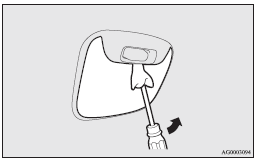
1. Insert a straight blade (or minus) screwdriver with a cloth over its tip into the notch of the lamp assembly and pry gently to remove the lens.
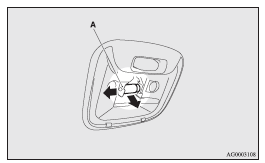
2. While holding down the tab (A), pull out the bulb.
3. To install the bulb, perform the removal steps in reverse.
 Note
Note
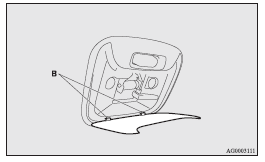
► When mounting the lens, align the tabs (B) with the holes on the vehicle body.
See also:
Windscreen wipers
Note
► To ensure a clear rearward view, the rear window wiper will automatically perform
several continuous operations if the gearshift lever or the selector lever is put
in the “R” po ...
Curtain airbag system
The curtain airbags are contained in the front pillars and roof side rail. The
curtain airbag is designed to inflate only on the side of the vehicle that is impacted,
even with no passenger in the ...
Operating range for starting the engine
The operating range is the interior of the vehicle.
: Forward direction
: Operating range
Note
► Even if it is within the operating range, if the keyless operation key is in
a small i ...