Instruments
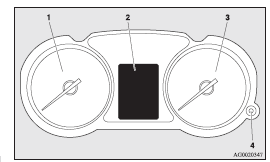
1- Tachometer ®
2- Multi-information display ®
Information screen display list ®
3- Speedometer (km or mph + km/h)
4- Daytime dipper button (meter illumination control) ®
See also:
To play from a USB memory device
1. Press the PWR button (3) to turn on the audio system. The system turns on
in the last mode used.
2. Connect your USB memory device to the USB input terminal. Refer to “How to
connect a USB m ...
Brake warning display
This warning is displayed if you drive with the parking brake still applied.
The warning lamp in the instrument cluster only illuminates when the parking brake
is applied.
Caution
► If ...
At extreme cold ambient temperature
If the engine won’t start, depress the accelerator pedal about halfway while
cranking the engine. Once the engine starts, release the accelerator pedal.
CAUTION
When starting the engine, make su ...