
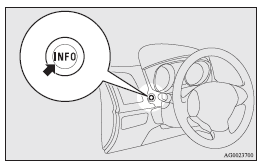
Multi-information meter switch
Each time the multi-information meter switch is operated, a sound is emitted and the multi-information display changes between information such as warnings, odometer (Type 1), tripmeter, service reminder, engine coolant temperature (Type 1), average and momentary fuel consumption, driving range, and average speed.
It is also possible to change elements such as the language and units used on the multi-information display by operating the multi-information meter switch.

 mark display screen (when the ignition
switch or the operation mode is OFF)
mark display screen (when the ignition
switch or the operation mode is OFF)
If you press the multi-information meter switch and return from the warning display
screen to the previous screen, the
mark is displayed.
Refer to “To return to the screen displayed before the warning display”.
This mark is also displayed if there is another warning other than the one displayed.
When the cause of the warning display is eliminated, the
mark goes out automatically.
 NOTE
NOTE
• When the mark is displayed,
the warning display screen can be redisplayed on the information screen.
Refer to “Information screen (when the ignition switch or the operation mode is OFF)”.
Refer to “Information screen (when the ignition switch or the operation mode is ON)”.
See also:
Sedan
Place the grove of clip top as shown, then remove the cover.
Remove the bulb from the socket by turning it anticlockwise while pressing it
inward. ...
Operation of the automatic transmission INVECS-II
CAUTION
(1) Before selecting a gear with the engine running and the vehicle stationary,
fully depress the brake pedal to prevent the vehicle from creeping. The vehicle
will begin to move as soon ...
Windscreen wipers
Type 1
- Misting function. The wipers
will operate once. - Off
- Intermittent operation at intervals
of approximately 4 seconds –Slow
–Fast
Type 2
- Misting function. The wipers wil ...