
Information screen (when the ignition switch or the operation mode is OFF)
Each time you lightly press the multi-information meter switch, the display screen switches in the following order.
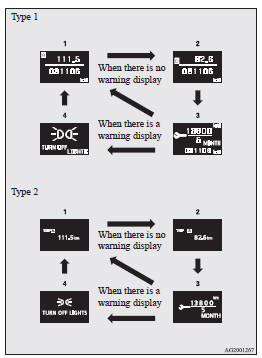
1- Odometer (Type 1)/Tripmeter 
2- Odometer (Type 1)/Tripmeter 
3- Service reminder
4- Redisplay of a warning display screen
See also:
Front fog lamp switch
The front fog lamps can be operated while the headlamps or tail lamps are on.
Turn the knob in the “ON” direction to turn on the front fog lamps. An indication
lamp in the instrument cluster w ...
Auto Stop & Go (AS&G) system
This paragraph summarizes the major items of the Auto Stop & Go (AS&G) system
such as the characteristics, operating procedures, etc. For details, refer to “Auto
Stop & Go (AS&G) ...
To listen to the radio
1- PWR (On-off) switch 2- VOL (Volume control) knob 3- U/M/L (UKW/MW/LW selection)
button 4- Audio adjust button 5- AUDIO button 6- TUNE/SEEK (Down-step/Down-seek)
button 7- TUNE/SEEK (Up-step/U ...