
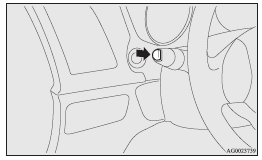
Headlamp washer switch
The headlamp washer can be operated with the ignition switch or the operation
mode in ON or ACC and the lamp switch at the
 position.
Push the button once and the washer fluid will be sprayed on to the headlamps.
 NOTE
NOTE
• If the ignition switch or the operation mode is in ON or ACC and the headlamps are on, the headlamp washer operates together with the windscreen washer the first time the windscreen washer lever is pulled.
Precautions to observe when using wipers and washers
• If the moving wipers become blocked by ice or other deposits on the glass, the motor may burn out even if the wiper switch is turned to OFF. If obstruction occurs, park your vehicle in a safe place, turn off the engine, and clean the deposits from the glass so that the wipers operate smoothly.
• Do not use the wipers when the glass is dry.
They may scratch the glass surface and the blades wear out prematurely.
• Before using the wipers in cold weather, check that the wiper blades are not frozen onto the glass. The motor may burn out if the wipers are used with the blades frozen onto the glass.
• Avoid using the washer continuously for more than 20 seconds. Do not operate the washer when the fluid reservoir is empty.
Otherwise, the motor may burn out.
• Periodically check the level of washer fluid in the reservoir and refill if required.
During cold weather, add a recommended washer solution that will not freeze in the washer reservoir. Failure to do so could result in loss of washer function and frost damage to the system components.
See also:
ACD control mode display
Example: “TARMAC” mode is selected.
The currently selected control mode is displayed on the multi-information display.
In addition, when the control mode is changed, the selected mode appears ...
Instruments and controls
LHD
1. Combination headlamps and dipper switch
Turn-signal lever
Front fog lamp switch*
Rear fog lamp switch
Headlamp washer switch*
2. Instruments
3. Shift paddles*
4. Windscreen ...
Changing the time until “REST REMINDER” is displayed
The time until the display appears can be changed.
1. Press and hold the multi-information meter switch for about 2 seconds or more
to switch from the setting mode screen to the menu screen.
Refer ...