
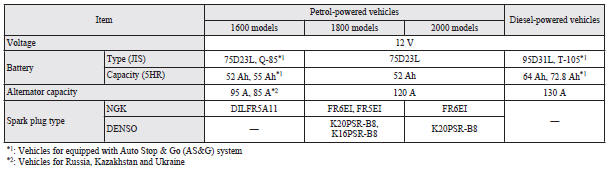
Electrical system
 NOTE
NOTE
• For vehicles equipped with the Auto Stop & Go (AS&G) system, contact a MITSUBISHI MOTORS Authorized Service Point when replacing the battery.
See also:
Instruments and controls
Note
► The fuel units, temperature units, display language, and other settings can
be changed.
Refer to “Changing the function settings (when the ignition switch is “ON”)”.
► ...
ACD (Active centre differential system) control mode display screen
The ACD operation status is displayed.
Refer to “ACD control mode switch”. ...