
Cooling
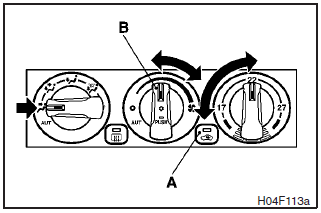
Set the mode selection dial to the “ ”
position.
”
position.
Set the air selection switch (A) to the outside position and push the air conditioning switch (B).
Adjust the temperature by turning the temperature control dial clockwise or anticlockwise. Select the desired blower speed.
NOTE
If the outside air is dusty or otherwise contaminated, or if high cooling performance is desired, set air selection switch to the recirculation position and the temperature control dial all the way to the left.
Switch to the outside position periodically to increase ventilation so that the windows do not become fogged up.
CAUTION
When using the air conditioning, the idling speed may slightly increase as the air conditioning compressor is switched on/off automatically. Especially for vehicles with an automatic transmission, while the vehicle is stationary, fully depress the brake pedal to prevent the vehicle from creeping.
See also:
Interior (LHD, RHD)
1. Luggage compartment levers
2. Coat hook
3. Assist grips
4. Supplemental restraint system - curtain airbag
5. Rear room lamp
6. Rear seat
7. Cup holder (for rear seat)
8. Armrest
9. ...
Petrol-powered vehicles with turbocharge
► Select engine oil of the proper SAE viscosity number according to the atmospheric
temperature.
SAE 5W-30, 0W-30 and 0W-40 engine oil can only be used if it meets ACEA A3/B3,
A3/B4 or A5 ...
Engine compartment fuse location table
1: Except for petrol-powered vehicles equipped with turbocharger
2: Petrol-powered vehicles with turbocharger
3: Fusible link
1: Except for petrol-powered vehicles equipped with turbochar ...