
Cigarette lighter
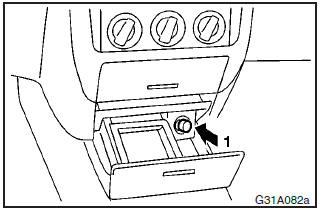
The cigarette lighter can be used while the ignition switch is in either “ON” or “ACC”.
1- Push all the way in.
The lighter will automatically return to its original position with a “click” when ready. Pull it out for use.
After use, insert the lighter to its original position in the socket.
NOTE
Do not leave the cigarette lighter removed from its socket, because the socket might become clogged by foreign material and be short-circuited.
CAUTION
(1) Do not touch heating element or lighter housing, hold the knob only
as burns may occur.
(2) Do not allow children to operate or play with the cigarette
lighter as burns may occur.
(3) Something is wrong with the cigarette lighter
if it does not pop back out within approximately 30 seconds of being pushed in.
Leaving the cigarette lighter pushed in for an extended period could cause fire.
If it does not pop out by itself, pull it out and have the problem corrected at
an authorized MITSUBISHI dealer.
(4) Do not leave the cigarette lighter pushed
in or insert the cigarette lighter from another vehicle. Otherwise, the lighter
may overheat and cause fire.
(5) It is recommended that only the lighter be inserted
in its socket. Use of “plug-in” type accessories may damage the socket and result
in poor retention of the lighter.
(6) When the cigarette lighter socket is used
as a power source for an electric appliance, be sure that the electric appliance
operates at 12 V and has an electric capacity of 120 W or less. In addition, long
use of the electric appliance without running the engine may run down the battery.
See also:
On a snow-covered or frozen road
(1) When driving on a snow–covered or frozen road, it is recommended that you
use snow tyres or tyre chains. Refer to the “Snow tyres” and “Tyre chains” sections.
(2) Avoid high–speed ...
Fuse replacement
1. Before replacing a fuse, always turn off the electrical circuit concerned
and place the ignition switch in the “LOCK” position.
2. Remove the fuse puller (A) from the inside of the fuse box ...
Installing a child restraint system to a3-point type seat belt (with
emergency locking
mechanism)
3-point type seat belt location
The child restraint system can be fitted by using the 3-point type seat belt
at the below illustrated seating position.
Installation:
1. Fasten the seat belt to ...