
Headlamps and position lamps
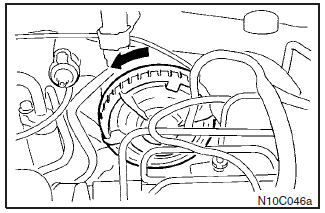
Remove the sealing cover by turning it anticlockwise and disconnect the connector.
See also:
Position lamps (except for vehicles equipped with high intensity discharge headlamps)
1. For petrol-powered vehicles equipped with turbocharger, when replacing the
bulb on the left side, remove the bolt (A) holding down the relay box and move the
relay box towards the rear of the v ...
Engine compartment
In the engine compartment, the fuse block is located as shown in the illustration.
1- Push the knob.
2- Remove the cover. ...
Roof antenna
To remove the roof antenna, turn it counterclockwise.
CAUTION
Be sure to remove the roof antenna before entering an automatic car wash or
other low-roofed area.
NOTE
Be sure to remove the ante ...