
Tyre rotation
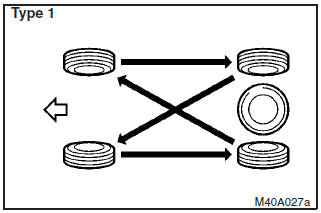
Tyre wear varies with vehicle conditions, road surface conditions and individual driver’s driving habits. To equalize the wear and help extend tyre life, it is recommended to rotate the tyres immediately after discovery of abnormal wear, or whenever the wear difference between the front and rear tyres is recognizable.
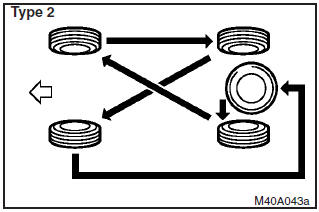
When rotating tyres, check for uneven wear and damage. Abnormal wear is usually caused by incorrect tyre pressure, improper wheel alignment, out of balance wheel, or severe braking. Consult your authorized MITSUBISHI dealer to determine the cause of irregular tread wear.
CAUTION
(1) A compact spare tyre can be fitted temporarily in place of a tyre that has been removed during the tyre rotation. However, it must not be included in the regular tyre rotation sequence.
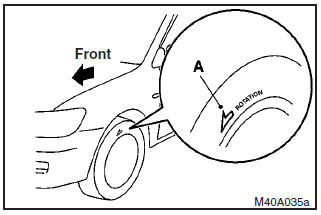
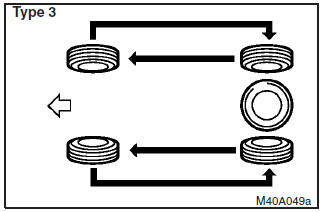
(2) If the tyres have arrows (A) indicating the correct direction of rotation, swap the front and rear tyres on the left–hand side of the vehicle and the front and rear tyres on the right–hand side of the vehicle separately. Keep each tyre on its original side of the vehicle. When fitting the tyres, make sure the arrows point in the direction in which the wheels will turn when the vehicle moves forward. Any tyre whose arrow points in the wrong direction will not perform to its full potential.
(3) Avoid the combined use of different types of tyres and disk wheels. This can affect driving safety.
See also:
Hydraulic power steering system (HPS)
The hydraulic power steering system (HPS) uses a hydraulic pressure pump to assist
the turning of the steering wheel.
Caution
► Do not leave the steering wheel turned all the way in one dir ...
Control panel
A- Temperature control dial
B- Air selection switch
C- Blower speed selection dial
D- Air conditioning switch
E- Mode selection dial
F- Rear window demister switch
Note
► There is an i ...
Rear seat
Folding the seatback forward
The right and left seatbacks can be folded forward separately.
Push the seatback forward
Push the seatback until it clicks and check if the seatback is locked.
NOTE
...