
Ignition switch turn-off reminder system
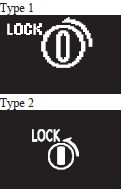
When the ignition switch is in any position other than the “LOCK” (PUSH OFF) position, if you close all the doors and the rear hatch then try to lock the doors and rear hatch by pressing the driver’s or front passenger’s door lock/unlock switch, or the rear hatch LOCK switch, a warning is issued with the warning display and the buzzer buzzing for about 3 seconds and you cannot lock the doors and rear hatch.
See also:
Deployment of front airbags and driver's knee airbag
The front airbags and driver’s knee airbag ARE DESIGNED TO DEPLOY when…
The front airbags and driver’s knee airbag are designed to deploy when the vehicle
suffers a moderate to severe frontal ...
Keyless entry system
Press the remote control switch, and all doors and the rear hatch will be locked
or unlocked as desired.
It is also possible to operate the outside rear-view mirrors.
1- LOCK switch
2- UNLOCK s ...
Manual window control*
1- To open 2- To close ...