
Locking and unlocking the door
Turning the emergency key in the forward direction locks the door, and turning it in the rear direction unlocks the door. Also refer to “Locking and unlocking: Doors”.
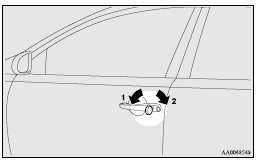
1- Lock
2- Unlock
See also:
Washer fluid
The windscreen washer fluid reservoir is in the engine compartment.
Check the washer fluid level at regular intervals and add washer fluid to reservoir
if necessary.
Open the reservoir cap and che ...
Roof drip moulding
When installing the roof carrier, remove the roof drip moulding caps.
1. Open the cover (A) and remove the screws using a Philips screwdriver. 2.
Remove the caps by sliding them.
After removal o ...
Sun visors
1- To eliminate front glare
2- To eliminate side glare
Vanity mirror
Type 1
A vanity mirror is fitted to the back of the sun visor.
Operating the lid of the vanity mirror will automatically tur ...