
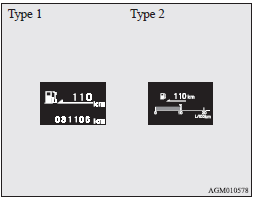
Driving range display
This displays the approximate driving range (how many more kilometres or miles you can drive).
When the driving range falls below approximately 50 km (30 miles), “---” is displayed. Refuel as soon as possible.
 Note
Note
► The driving range is determined based on the fuel consumption data. This may
vary depending on the driving conditions and habits.
Treat the distance displayed as just a rough guideline.
► When you refuel, the driving range display is updated.
However, if you only add a small amount of fuel, the correct value will not be displayed.
Fill with a full tank whenever possible.
► On rare occasions, the value displayed for the driving range may change if you
are parked on an extremely steep incline. This is due to the movement of fuel in
the tank and does not indicate a malfunction.
► The display setting can be changed to the preferred units (km or miles).
Refer to “Changing the function settings (when the ignition switch is “ON”)”.
See also:
Locking and unlocking the door
Turning the emergency key in the forward direction locks the door, and turning
it in the rear direction unlocks the door. Also refer to “Locking and unlocking:
Doors”.
1- Lock
2- Unlock ...
Information screen (when the ignition switch or the operation mode is OFF)
Each time you lightly press the multi-information meter switch, the display screen
switches in the following order.
1- Odometer (Type 1)/Tripmeter
2- Odometer (Type 1)/Tripmeter
3- Servic ...
2013 Mitsubishi Lancer Review
In a segment defined by value and gas mileage, the sporty Lancer GT doesn't
cut it against its best competitors — or even against the average ones.
Though you wouldn't know just by looking, the ...