
Starting the engine (diesel-powered vehicles)
[For vehicles equipped with keyless operation system]
For information on operations for vehicles equipped with the keyless operation system, refer to “Keyless operation system: Starting” on pages 1-17, 1-20.
[Except vehicles equipped with keyless operation system]
1. Insert the ignition key and fasten the seat belt.
2. Make sure the parking brake is applied.
3. Depress and hold the brake pedal.
4. Fully depress the clutch pedal.
 Note
Note
► On vehicles with the Auto Stop & Go (AS&G) system, the starter will not operate unless the clutch pedal is fully depressed (Clutch interlock).
5. Place the gearshift lever in the “N” (Neutral) position.
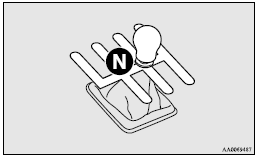
6. Turn the ignition key to the “ON” position.
The diesel preheat indication lamp will first illuminate, and then after a short time go out, indicating that preheating is completed.
Note
► If the engine is cold, the diesel preheat indication lamp is on for a longer
time.
► When the engine has not been started within about 5 seconds after the diesel preheat
indication lamp went out, return the ignition key
to the “LOCK” position. Then, turn the key to the “ON” position to preheat the engine
again.
► When the engine is warm, the diesel preheat indication lamp does not come on even
if the ignition key is placed in the “ON” position.
Start the engine by turning the ignition key right to the “START” position.
7. Turn the ignition key to the “START” position without depressing the accelerator pedal, and release it when the engine starts.
Note
► Minor noises may be heard on engine startup.
These will disappear as the engine warms up.
Using the MIVEC engine
The MIVEC engine automatically controls valve timing in accordance with driving conditions for maximum engine performance.
Note
► To protect the engine, the high-speed mode may not be selected while the engine coolant temperature is low.
See also:
Digital clock
Following modes are available for clock adjustment: MITSUBISHI genuine audio:
“Auto mode” and “Manual mode”
Non genuine audio: “Manual mode” only
Selection of “Auto mode” or ...
Driver’s and front passenger’s airbag system
The driver’s airbag is located under the padded cover in the middle of the steering
wheel. The front passenger’s airbag is contained in the instrument panel above the
glove box.
The driver’ ...
Change of display mode (for vehicles with a MITSUBISHI genuine audio system)
Every time the “DISP” button is pressed lightly (less than 2 seconds), the display
can be changed.
Average fuel consumption Driving range Average speed
...