
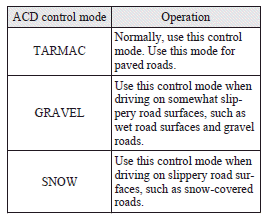
ACD control mode
Select the control mode from the following three types to suit the driving conditions.
See also:
SRS servicing
The entire SRS including air bag and pretensioner seat belt must be inspected
by an authorized MITSUBISHI dealer after 10 years.
WARNING
(1) Any maintenance performed on or near the components of ...
New harmony
In keeping with Mitsubishi Outlander's forte, the all-new next generation
Outlander will continue to carry five or seven people in comfort and safety,
supported by a powerful electronic architectu ...
Tips for starting
(1) Do not operate the starter motor continuously for anything longer than 10
seconds; doing so could run down the battery. If the engine does not start, turn
the ignition switch back to “LOCK†...