
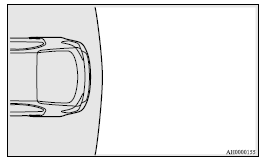
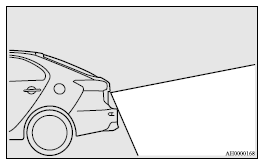
Range of view of rear-view camera
The range of view of the rear-view camera is limited to the area shown in the illustrations. It cannot show both sides and the lower part of the rear bumper, etc.
When reversing, be sure to visually confirm safety around the vehicle.
Location of rear-view camera
The rear-view camera (A) is integrated into the part near the rear hatch handle.
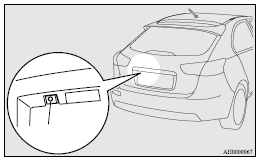
Range of view of rear-view camera
See also:
Ride Quality & Noise
When you're not having fun tossing this car around, you're really not having
fun. The ride is harsher than an all-wheel-drive Lancer we tested without the
sports suspension; rough roads jostle the ...
Operating hints
► Do not let the clutch slip (vehicles equipped with M/T only) and do not increase
the engine speed more than necessary when starting.
► Be sure that the driving speed does not exceed 1 ...
Operation from outside the vehicle
Insert (or remove) the key when the boot lid (or tailgate) key cylinder is in
the vertical or the horizontal position.
Rotate the key to lock or unlock as shown in the illustration.
1- Unlock 2- ...