
Temperature control dial
Turn the temperature control dial clockwise or anticlockwise.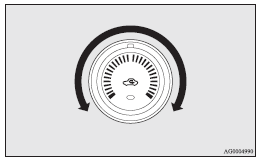
 Note
Note
► While the engine coolant temperature is low, the temperature of the air from the heater will be cool/cold until the engine warms up, even if you have selected warm air with the dial.
See also:
Fuel selection
CAUTION
• For petrol-powered vehicles, the use of leaded fuel can result in serious
damage to the engine and catalytic converter. Do not use leaded fuel.
• Diesel-powered vehicles are desig ...
Redesigned Front Suspension
The MacPherson strut front suspension is similar in layout to the previous
Lancer's, but all-new, with a sharpened focus on enhancing rigidity while
reducing weight and lowering the roll center. S ...
How to adjust the tone
Press the AUDIO button (5) to select BASS - TREBLE - FADER - BALANCE Audio adjust
mode off.
BASS (Bass tone control) Press the audio adjust button (4) either
or
to select the desired bass tone ...