
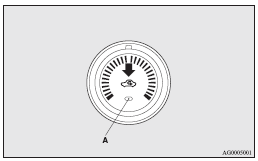
Air selection switch
To change the air selection, simply press the air selection switch.
A sound will be made every time you push the switch.
► Outside air: Indication lamp (A) is OFF Outside air is introduced into the
passenger compartment.
► Recirculated air: Indication lamp (A) is ON Air is recirculated inside the passenger
compartment.
 Caution
► Normally, use the outside position to keep the windscreen and side windows
clear and quickly remove fog or frost from the windscreen.
If the outside air is dusty or otherwise contaminated use the recirculation position.
Switch to the outside position periodically to increase ventilation so that the
windows do not become fogged up.
► Use of the recirculation position for extended time may cause the windows to fog
up.
 Note
Note
► When the heater operates with the selection switch in the outside position,
the system automatically determines whether to continue using outside air or to
perform recirculation.
If the outside air temperature is high, the system selects recirculation and causes
the indication lamp (A) in the switch to illuminate.
Press the selection switch to return to outside air introduction.
See also:
For the front seat
The cup holder is located in front of the floor console.
Type 1
Type 2
To use the cup holder, open the lid.
...
General maintenance
Fuel, engine coolant, oil and exhaust gas leakage
Look under the body of your vehicle to check for fuel, engine coolant, oil and
exhaust gas leaks.
Warning
► If you see a suspicious fuel l ...
Power type (driver’s side only)
Adjust the seat by operating the switch as indicated by the arrows.
1- Adjustment forward
2- Adjustment backward
Note
► To prevent the battery from running down, operate the power type se ...