
Headlamps (high-beam, except for vehicles with high intensity discharge headlamps)
1. When replacing the bulb on the right side of the vehicle, remove the bolt (A) holding down the washer tank spout and move the spout towards the rear of the vehicle.
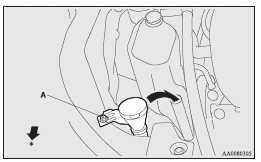
: Front of the vehicle
2. Turn the cap (B) anticlockwise to remove it.
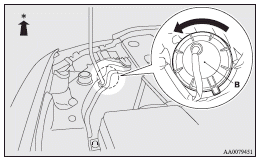
: Front of the vehicle
3. Turn the bulb (C) anticlockwise to remove it.
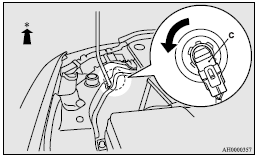
: Front of the vehicle
4. While pressing the tab (D), pull out the bulb (E).
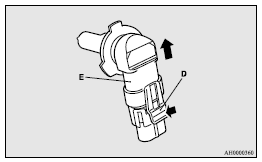
5. To install the bulb, perform the removal steps in reverse.
 Caution
► Handle halogen lamp bulbs with care.
The gas inside halogen lamp bulbs is highly pressurized, so dropping, knocking,
or scratching a halogen lamp bulb can cause it to shatter.
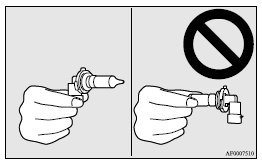
► Never hold the halogen lamp bulb with a bare hand, dirty glove, etc. The oil from
your hand could cause the bulb to break the next time the headlamps are operated.
If the glass surface is dirty, it must be cleaned with alcohol, paint thinner, etc.,
and refit it after drying it thoroughly.
See also:
Gearshift lever positions (Manual shift gate)
“P” PARK
This position locks the transmission to prevent the vehicle from moving. The
engine can be started in this position.
“R” REVERSE
This position is to back up.
Caution
► N ...
Cleaning plastic parts
Use a sponge or chamois leather.
If a car wax adheres on a grey or black rough surface of the bumper, moulding
or lamps, the surface becomes white. In such a case, wipe it off using lukewarm
wate ...
Vehicle weight
: In case of trailer towing
Note
► Trailer specifications indicate the manufacturer’s recommendation.
1: Vehicles for Russia, Kazakhstan and Ukraine
2: In case of trailer towing
Not ...