
Reversing lamps
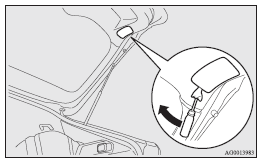
1. Insert a straight blade (or minus) screwdriver with the end covered with a cloth or other object into the cut out area of the cover and pry gently to remove the cover.
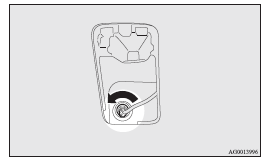
2. Remove the socket and bulb assembly by turning it anticlockwise.
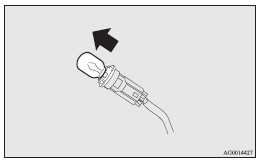
3. Remove the bulb by pulling it out.
4. To install the bulb, perform the removal steps in reverse.
 Note
Note
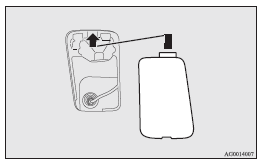
► When installing the lid, align the tab on the lid with the hole on the vehicle side.
See also:
New harmony
In keeping with Mitsubishi Outlander's forte, the all-new next generation
Outlander will continue to carry five or seven people in comfort and safety,
supported by a powerful electronic architectu ...
To listen to the radio
1. Press the PWR switch (1) or the AM/FM button (2) to turn ON the radio.
Press the PWR switch again to turn OFF the radio.
2. Press the AM/FM button (2) to select the desired band.
3. Turn the TUN ...
Towing the vehicle by a tow truck
Caution
► This vehicle must not be towed by a tow truck using sling lift type equipment
(Type A) as illustrated. Using a sling lift will damage the bumper and front end.
► Do not tow ...