
Licence plate lamps
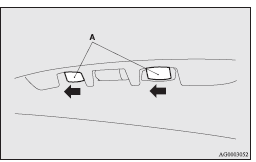
1. Remove while pressing the lamp unit (A) to the left side.
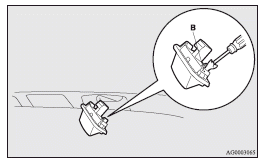
2. Insert a minus screwdriver with the end covered with a cloth or other object to press the hook (B) aside and remove the lens.
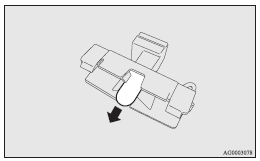
3. Remove the bulb by pulling it out.
4. To install the bulb, perform the removal steps in reverse.
 Note
Note
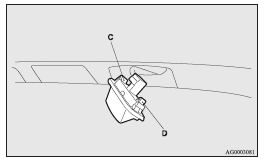
► When installing the lamp, insert tab (C) first then align and insert tab (D).
See also:
Interior
1. Electric window control switch
2. Lock switch
3. Electric remote-controlled outside rear-view mirrors switch
4. Central door lock switch
5. Front room & map lamps
6. Sunroof switch
...
How to enter frequencies in the memory
Manual setting
You can assign to the memory select buttons (8) a maximum of 12 stations in the
UKW band (6 U1 stations and 6 U2 stations), 6 stations in the MW band and 6 stations
in the LW ban ...
Manual reset mode
► When the average speed is being displayed, if you hold down the multi-information
meter switch, the average speed displayed at that time is reset.
► When the ignition switch is switch ...