
Electrical system
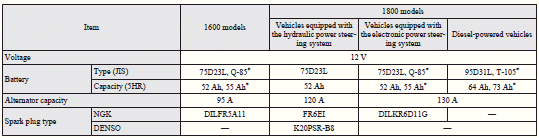
Vehicles equipped with Auto Stop & Go (AS&G) system
 Note
Note
► For vehicles equipped with the Auto Stop & Go (AS&G) system, contact a MITSUBISHI MOTORS Authorized Service Point when replacing the battery.

: Optional equipment
See also:
Speaker enrollment function
The Bluetooth® 2.0 interface can use the speaker enrollment function to create
a voice model for one person per language.
This makes it easier for the Bluetooth® 2.0 interface to recognise voice ...
Changing the security alarm settings
It is possible to set the security alarm to the “active” mode or “inactive” mode.
Follow the procedure below.
1. Turn the ignition switch to the “LOCK” position.
If you started the engi ...
Cargo net*
To use, attach the cargo net to the hooks as shown in the illustration. ...