
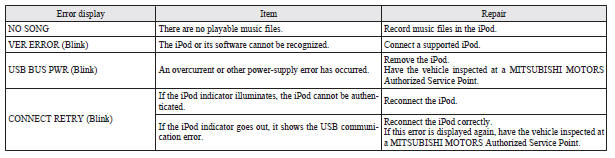
Error codes (iPod)
If an error code appears in the display, take action in accordance with the table below.
See also:
Outside (Front)
1. Bonnet
2. Windscreen wipers
3. Sunroof
4. Outside rear-view mirrors
5. Fuel tank filler
6. Locking and unlocking
Keyless entry system
Keyless operation system
7. Side turn-signal l ...
Headlamp levelling switch
The angle of the headlamp beam varies depending upon the load carried by the
vehicle.
The headlamp levelling switch can be used to adjust the headlamp illumination
distance (when the lower beam ...
Parking
Parking on a slope
Fully engage the parking brake, and then move the gearshift lever to 1st (on
an uphill) or reverse (on a downhill) position on manual transmission vehicle. On
automatic transmi ...