
To listen to the radio
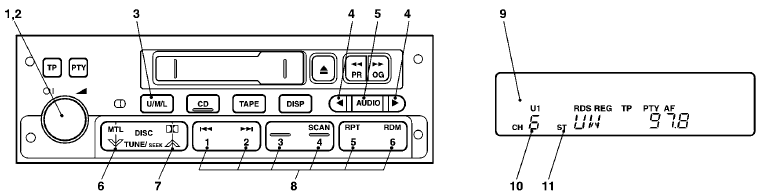
1- PWR (On-off) switch
2- VOL (Volume control) knob
3- U/M/L (UKW/MW/LW selection)
button
4- Audio adjust button
5- AUDIO button
6- TUNE/SEEK (Down-step/Down-seek)
button
7- TUNE/SEEK (Up-step/Up-seek) button
8- Memory select buttons
9- Frequency
display window
10- Preset memory number display
11- ST (Stereo) indicator
1. Press the PWR switch (1) to turn on the radio.
Press the PWR switch again
to switch it off.
2. Press the U/M/L button (3) to select the desired band (U1/U2/MW/LW).
3. Press the TUNE/SEEK button (6 or 7) or one of the memory select buttons (8) to
tune to a station.
Refer to “How to adjust the tune” or “How to enter frequencies
in the memory” on page 6–5.
See also:
Engine coolant temperature display
This indicates the engine coolant temperature.
If the coolant becomes hot, will
blink.
Pay careful attention to the engine coolant temperature display while you are
driving.
Caution
► ...
Engine oil
To check and refill engine oil
Petrol-powered vehicles
Diesel-powered vehicles
The engine oil used has a significant effect on the engine’s performance, service
life and startability.
Be s ...
Manual transmission
The shift pattern is shown on the gearshift lever knob. Be sure to always fully
depress the clutch pedal before attempting to shift the lever. ...