
Rear shelf panel (Hatchback)
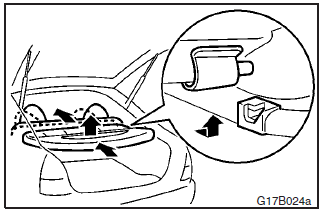
To remove
1. Pull the knob and tilt the rear seat back slightly forward.
2. Slightly
lift up the front edge of the rear shelf. Slide the rear shelf rearward by tapping
it lightly at the right and left sides to release the pins from the catches.
3.
Lift the rear shelf and remove it.
See also:
During a long period of disuse
The air conditioning should be operated for at least five minutes each week,
even in cold weather. This is to prevent poor lubrication of the compressor internal
parts, and to maintain the air con ...
Cruise control
Cruise control is an automatic speed control system that keeps a set speed. It
can be activated at speeds from about 40 km/h (25 mph) up to about 200 km/h (124
mph).
Caution
► When you do ...
Centre panel
1. Audio
MITSUBISHI Multi-Communication System®
Refer to the separate “MITSUBISHI Multi-Communication System owner’s manual”
2. Front passenger seat belt warning lamp
3. Rear window demis ...