
Locking and unlocking the door
Turning the emergency key in the forward direction locks the door, and turning it in the rear direction unlocks the door. Also refer to “Locking and unlocking: Doors”.
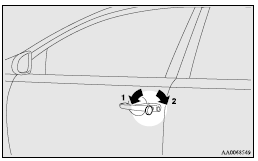
1- Lock
2- Unlock
See also:
If your vehicle is to be towed by another vehicle
1. Take out the towing hook, wheel nut wrench and jack bar. (Refer to “Tools
and jack”.)
2. Cover the tip of the jack bar with a cloth, then use it to remove the cover
(A) that is located on ...
How to use the rear-view camera
When you place the gearshift lever or the selector lever in the “R” position
with the ignition switch in the “ON” position, the view behind the vehicle will
automatically appear on the scr ...
Change of air selection
Every time the air selection switch is pressed, alteration is made between outside
air introduction and inside air recirculation. When inside air is recirculated,
the indicator lamp (A) comes on ...