
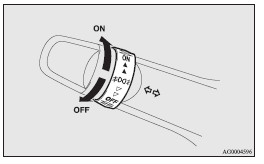
Front fog lamp switch
The front fog lamps can be operated while the headlamps or tail lamps are on. Turn the knob in the “ON” direction to turn on the front fog lamps. An indication lamp in the instrument cluster will also come on. Turn the knob in the “OFF” direction to turn off the front fog lamps. The knob will automatically return to its original position when you release it.
 Note
Note
► The front fog lamps are automatically turned off when the headlamps or tail
lamps are turned off. To turn the front fog lamps on again, turn the knob in the
“ON” direction after turning on the headlamps or tail lamps.
► Do not use fog lamps except in conditions of fog, otherwise excessive lamp glare
may temporarily blind oncoming vehicle drivers.
► In case of vehicles equipped with Daytime Running Lamp, the front fog lamps can
be operated even if the lamp switch is set to the “OFF” position.
See also:
Volume and tone control panel
1- PWR (On-Off) switch
2- VOL (Volume control) knob
3- Display
4- SOUND (Sound control) switch
To adjust the volume
VOL (Volume control)
Turn the VOL knob clockwise to increase the volume;
an ...
To adjust seat cushion height (driver’s side only)
Seat cushion height can be adjusted.
To alter the height of the front of seat cushion
1- Raise 2- Lower
To alter the height of the rear of seat cushion
3- Raise 4- Lower ...
To check the fluid level
The fluid level must be between the “MAX” and “MIN” marks on the reservoir.
The fluid level is monitored by a float. When the brake fluid level falls below
the “MIN” mark, the brake f ...