
Changing the security alarm settings
It is possible to set the security alarm to the “active” mode or “inactive” mode.
Follow the procedure below.
1. Turn the ignition switch to the “LOCK” position.
If you started the engine with the key, remove the key from the ignition switch.
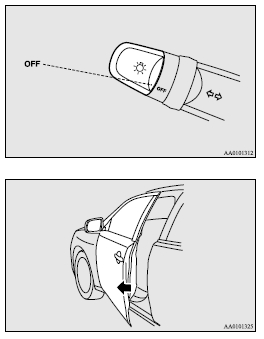
2. Place the lamp switch in the “OFF” position, and leave the driver’s door open.
3. Pull the windscreen wiper and washer switch towards you and hold it there. (Since the ignition switch is in the “LOCK” position, washer fluid will not be sprayed.)
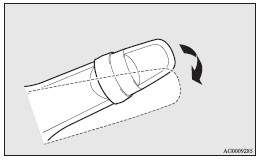
4. After approximately 10 seconds, the buzzer will make a sound. Keep the windscreen
wiper and washer switch pulled towards you. (If the windscreen wiper and washer
switch was released, the setting change mode would be cancelled. To start over,
perform the procedure again from step 3.)
5. When the buzzer stops, with the windscreen wiper and washer switch still pulled
towards you, press the UNLOCK switch (A) on the remote control switch to select
the security alarm settings mode.
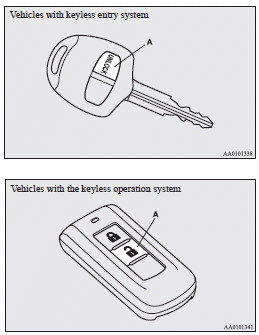
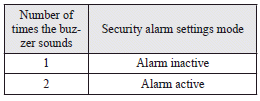
The settings mode can be toggled by pressing the UNLOCK switch. The mode can be confirmed from the number of times the buzzer sounds.
6. Any of the following operations can be used to terminate the system settings change mode.
• Releasing the windscreen wiper and washer switch.
• Closing the driver’s door.
• Inserting the key into the ignition switch.
• Placing the lamp switch in any position other than “OFF”.
• Allowing 30 seconds to pass without making any changes to the settings.
• Push the ignition switch to the “LOCK” (PUSH ON) position (Vehicles with keyless
operation system).
 Note
Note
► If anything with regard to making changes to the security alarm system settings
is hard to understand, please consult your MITSUBISHI MOTORS Authorized Service
Point.
► Avoid leaving valuable items inside the vehicle even when the security alarm system
has been set to the “active” mode.
See also:
Indication and warning lamp list
1. “Adaptive Front lighting System (AFS) warning lamp”
2. Position lamp indication lamp ®
3. High-beam indication lamp ®
4. Charge warning lamp ®
5. Turn-signal indication lamps/Hazard wa ...
AWC control fluid
To check the fluid level
The AWC control fluid reservoir is in the luggage compartment.
Note
► Check the fluid level in the reservoir 90 minutes or more after turning the
ignition switch t ...
How to enter frequencies in the memory
Manual setting
You can assign to the memory select buttons (8) a maximum of 12 stations in the
UKW band (6 U1 stations and 6 U2 stations), 6 stations in the MW band and 6 stations
in the LW ban ...