
Sunroof
The sunroof can only be operated with the ignition switch in the “ON” position.
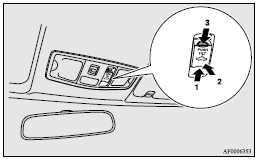
1- Open
2- Tilt up
3- Close, Tilt down
To open, press the switch (1).
To stop the moving sunroof, press switch (2) or (3).
 Note
Note
► The sunroof automatically stops just before reaching the fully open position.
Press the switch again to fully open it.
To close, press the switch (3).
To stop the moving sunroof, press the switch (1) or (2).
To tilt up, press the switch (2).
The rear edge of the sunroof rises for ventilation.
To tilt down, press the switch (3).
 Warning
► Do not put head, hands or anything else out of the sunroof opening while
driving the vehicle.
► Never leave a child (or other person who might not be capable of safe operation
of the sunroof switch) in the vehicle alone.
► Before operating the sunroof, make sure that nothing is capable of being trapped
(head, hand, finger, etc.).
See also:
Waiting
For short waiting periods, such as at traffic lights, the vehicle can be left
in gear and held stationary with the service brake.
For longer waiting periods with the engine running, the selector le ...
Fuel remaining display screen
This displays the amount of fuel remaining.
CAUTION
• For petrol-powered vehicles, do not run out of fuel, or the catalytic converter
may be adversely affected.
If the warning display appear ...
Selector lever position display screen (vehicles with CVT)/ Gearshift lever
position display screen (vehicles with Twin Clutch SST)
Shows the position of the selector lever or gearshift lever.
Refer to “Selector lever operation”.
Refer to “Gearshift lever position display”. ...