
Fuel remaining display screen
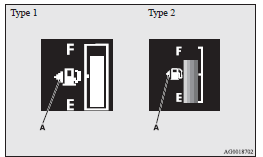
This displays the amount of fuel remaining.
 CAUTION
• For petrol-powered vehicles, do not run out of fuel, or the catalytic converter may be adversely affected.
If the warning display appears, refuel as soon as possible.
• For diesel-powered vehicles, do not drive with an extremely low fuel level; running out of fuel could cause damage to the fuel system.
 NOTE
NOTE
• It may take several seconds to stabilise the display after refilling the tank.
• If fuel is added with the ignition switch or the operation mode is in ON, the fuel gauge may incorrectly indicate the fuel level.
Fuel lid mark
The arrow (A) indicates that the fuel tank filler is located on the left side of the body.
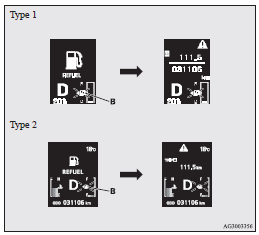
Fuel remaining warning display
When the fuel is reduced to about 10 litres, the information screen switches
to the interrupt display of the fuel remaining warning display, and the
 mark (B) on the fuel remaining display
flashes slowly (about once per second). After a few seconds, the information screen
returns from the fuel remaining warning display to the previous screen.
mark (B) on the fuel remaining display
flashes slowly (about once per second). After a few seconds, the information screen
returns from the fuel remaining warning display to the previous screen.
When the fuel is reduced further to about 5 litres, the information screen switches
to the fuel remaining warning display and the
mark (B) on the fuel remaining display
flashes quickly (about twice per second).
NOTE
• On inclines or curves, the display may be incorrect due to the movement of fuel in the tank.
See also:
Steering control switch
1- Volume up button
2- Volume down button
3- SPEECH button
4- PICK-UP button
5- HANG-UP button
Volume up button
Press this button to increase the volume.
Volume down button
Press this button ...
Modification/alterations to the electrical or fuel systems
MITSUBISHI MOTORS CORPORATION has always manufactured safe, high quality vehicles.
In order to maintain this safety and quality, it is important that any accessory
that is to be fitted, or any mod ...
LW/MW/FM digital tuning radio with CD changer
The audio system can only be used when the ignition switch is in the “ON” or
“ACC” position.
Note
► When listening to the audio system while the engine is not running, be sure
to ...